A request comes through your website. Someone copies it into a tracker. Another person asks for missing information. The work waits until somebody notices the reply.
Each step is small. Together, they create a job your team has to remember to do.
That is a useful place to start a conversation about AI: one recurring job, described clearly enough that everyone can see where it begins, where it waits and what counts as finished.
Start with the last real example
Pick a request your team handled recently. Walk through what happened in order.
Where did it arrive? Which person opened it? What did they copy? What information was missing? Who could decide that the work was ready to move on?
Use the names of the tools and roles your team actually uses. “Customer follow-up” is broad. “A coordinator checks the inbox for a signed form, updates the tracker and tells the reviewer” gives you something concrete to examine.
You may find that the repetitive work sits between two systems you already have. You may also find that an exception is the reason a person still needs to be involved.
Draw what happens today
A useful map separates the current workflow from an idea for improving it.
If a person enters a request manually today, keep that step visible. If you propose sending the request to the tracker automatically, label that route as a proposal. The map should help your team discuss a change without suggesting it has already been installed.
It should also leave unanswered questions visible. If nobody has explained when payment happens, that connection is still unknown. Drawing a confident arrow would hide a scoping question.
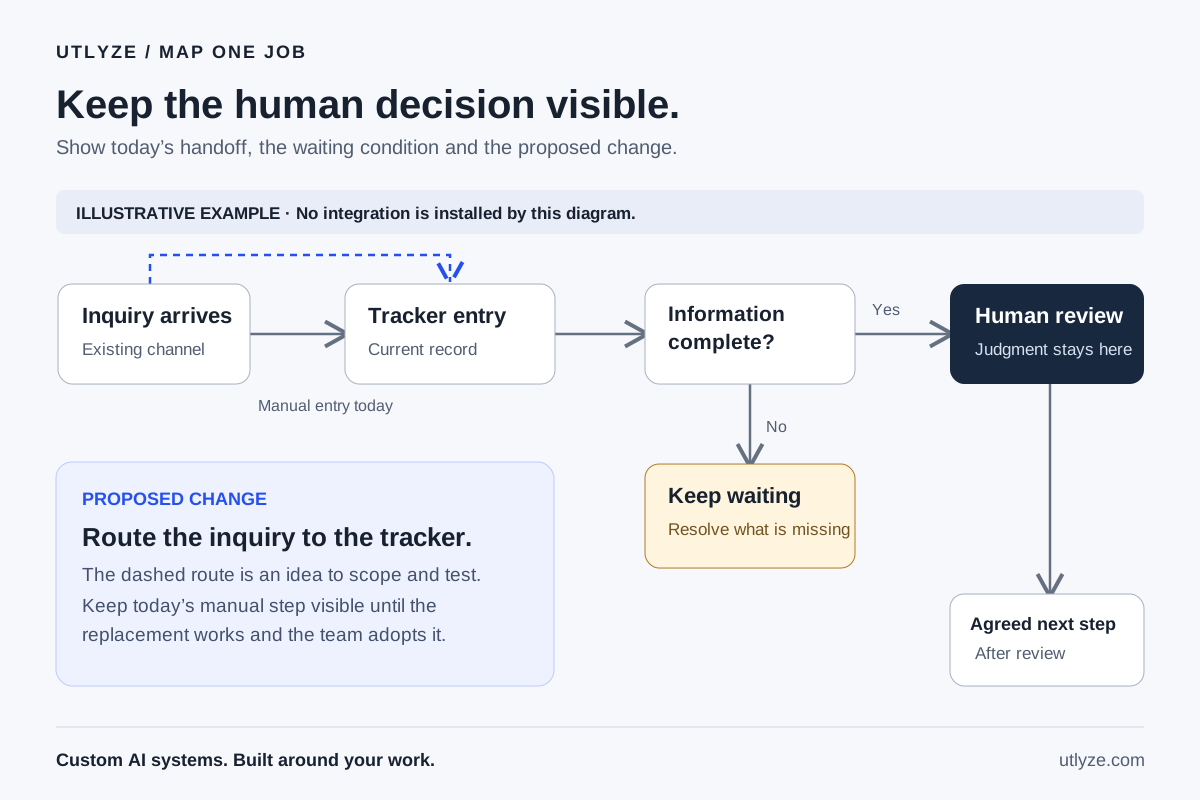
Name the point where work must wait
In a fictional workflow we used to exercise the Utlyze advisor, an order could not proceed without consent. The map needed to show both outcomes: work that could continue and work that had to remain on hold. It also needed to keep the reviewer’s role visible.
That exercise is a demonstration of mapping behavior, not a customer result or an installed screening system. The practical lesson applies to ordinary operations: define what is missing, who resolves it and what is allowed to happen next.
For your business, that might be a signed scope, a confirmed appointment or a manager’s decision. The pause belongs in the design.
Choose a small change you can verify
Once the map is clear, choose one handoff to improve. Describe the result in terms your team can check.
For example: a new request creates one tracker entry; missing information keeps it waiting; a person can correct the entry; and a retry does not create a duplicate. These are example acceptance conditions, not claims about an integration already running.
Measure the existing job before attaching a savings claim to the change. Record how often it happens, the time people spend and the exceptions they handle. After a scoped build, measure the same things again.
Utlyze designs, builds and runs custom AI systems around how a business works. The advisor helps you describe a recurring job and build a visible system map. That conversation is a starting point; the build engagement still needs scoping.
Contributors

James Brady
Direction

GPT-6 AstraAI
Drafting
GPT-6AI
Review · Source integration · Verification